Projects

UX Case Study

Sportsbook Betslip

Build a functional, interactive betslip prototype with automated calculations, dynamic betting logic, and a realistic sportsbook user experience.

Overview

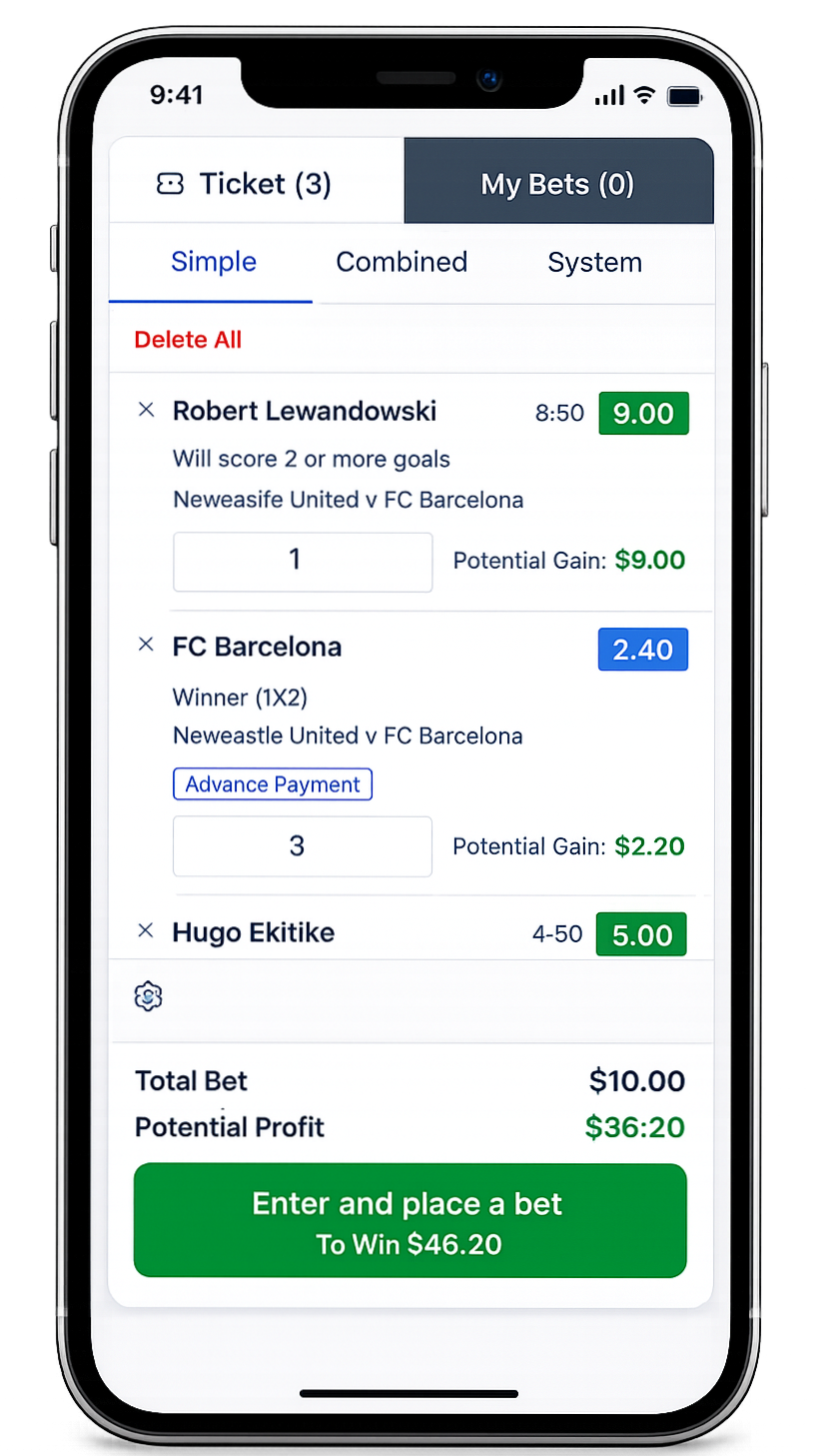
This prototype focuses on creating a simple but interactive betslip wireframe that demonstrates the core behaviors of a sportsbook betting interface:

  • Entering stake amounts
  • Automatically calculating potential winnings
  • Managing bet selections
  • Displaying total stake and possible returns

The goal is to provide instant feedback and a clear overview of risk versus reward, helping users make faster and more confident betting decisions.

Improve clarity and interactivity in existing betslips to enhance usability and conversion by showing real-time payout calculations.

  • Sports betting interfaces often suffer from:
  • Unclear payout calculations
  • Slow feedback when entering stakes
  • Poor bet management controls

These issues increase cognitive load and can lead to mistakes when placing bets.

Create a betslip experience that dynamically calculates potential winnings based on stake input and provides clear controls for managing bets, improving usability and transparency in the betting flow.

I worked as a Product Designer, responsible for designing an interactive sportsbook betslip prototype with real-time payout calculations and improved user flow, enhancing clarity and betting confidence.

Scope of Work

  • UX Design (interaction design, information hierarchy)
  • UI Wireframing (low-fidelity structure)
  • Front-end Prototyping (logic + behavior)
  • Product Thinking (conversion, usability, error prevention)

Timeline
2 months

Collaboration
I worked closely with:

  • Product Manager — to define goals, user needs, and success metrics
  • Product Owner — to align on requirements and prioritize features
  • Engineers — to ensure feasibility and implement realistic betting logic

This cross-functional collaboration ensured the solution was both user-centered and technically viable.

This project highlighted the importance of real-time feedback in financial interactions, especially in contexts like sports betting where users make quick, high-stakes decisions. By introducing dynamic payout calculations and clear bet management, I was able to reduce cognitive load and make the experience more transparent and intuitive.

Working on both the design and implementation deepened my understanding of how UX decisions translate into actual product behavior. It reinforced the value of thinking beyond static screens and focusing on interaction logic and system feedback.

Collaborating with product and engineering stakeholders also emphasized the need to balance user needs, business goals, and technical feasibility.

Overall, this project strengthened my ability to design practical, user-centered solutions that are not only visually clear but also functionally meaningful.

betslip mobile proto
Design System Case Study

Scalable
Design System

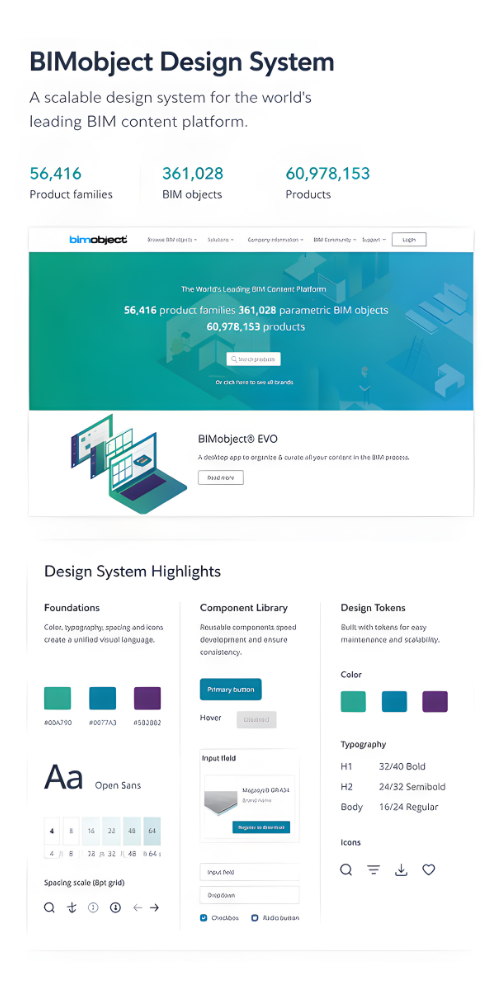
Led the creation of a unified design system at BIMobject to resolve inconsistencies across multiple sites and product features. By aligning UI, UX, and engineering around shared standards and reusable components, the initiative improved product consistency, reduced duplication, and enabled more efficient, scalable development.
Snapshot

Role: Design Lead (UI)
Team: UI Lead, UX Designer, Project Manager, Developers
Scope: Multiple sites & product features
Focus: Consistency, scalability, efficiency

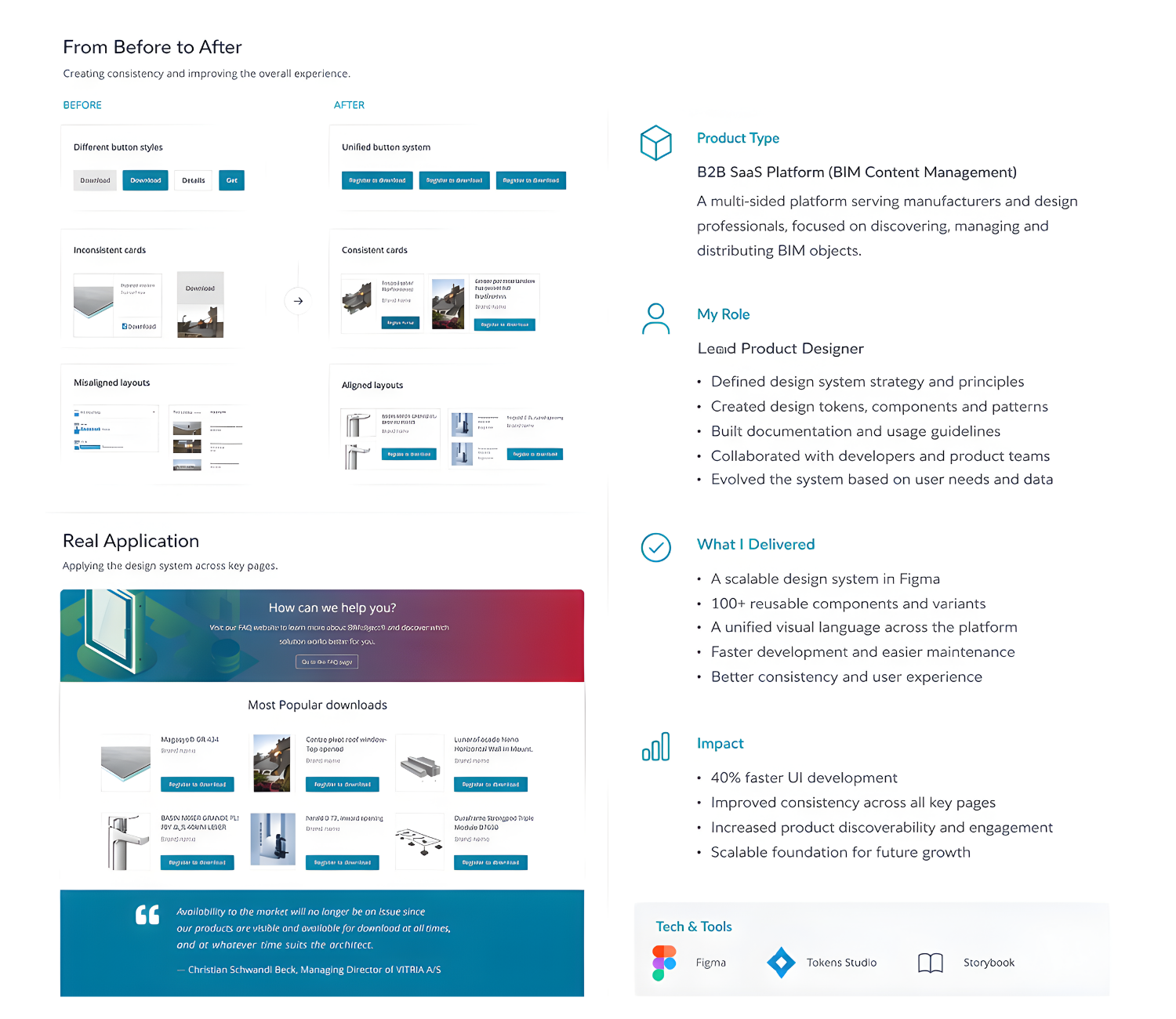
BIMobject’s platform had grown rapidly—but without a unified system.

This resulted in:

  • Inconsistent UI across different sites
  • Multiple versions of the same components
  • Fragmented UX patterns across features
  • Slower development due to duplicated work

👉 Users experienced a disjointed interface
👉 Teams struggled with alignment and efficiency

Create a unified design system to:

  • Standardize UI and interaction patterns
  • Align design, UX, and development
  • Reduce duplication and design debt
  • Enable faster, scalable product development

1. Audit & Mapping

  • Reviewed multiple products and features
  • Identified inconsistencies in UI and UX
  • Mapped component variations and usage gaps


2. Foundations

  • Defined the core system layer:
  • Color system → brand-aligned & accessible
  • Typography → structured for complex BIM data
  • Spacing & layout → consistent grid and rhythm
  • Interaction principles → unified behavior across features


3. Component System
Built a reusable library of components:

  • Buttons, inputs, dropdowns
  • Navigation patterns
  • Data-heavy UI (tables, filters, cards)

Each component included:

  • Variants and states
  • Usage guidelines
  • Design–dev alignment


4. Collaboration with Engineering

Worked closely with developers to:

  • Translate components into reusable code
  • Align the structure between design and implementation
  • Reduce interpretation gaps

👉 Result: system was actually used, not just documented


5. Governance & Rollout

With the Project Manager:

  • Defined ownership and contribution model
  • Created documentation for teams
  • Rolled out incrementally across features
  • Improved consistency across sites and features
  • Reduced duplicate components and design effort
  • Faster feature delivery using reusable patterns
  • Stronger alignment between design and development
  • Design systems fail without adoption strategy
  • Developer collaboration is critical from day one
  • Consistency requires ongoing governance, not a one-time effort
  • UI and UX must evolve together—not in isolation

Let’s Turn Your Ideas
into Reality

Scroll to Top